.webp)


Google Search Console for keyword research usually starts with an awkward export: a few hundred rows, most of them queries you never planned for, several of them sitting on page two. Reading the report is the easy half. Deciding which of those rows deserves a change to a live page is the work.
This Google Search Console keyword research guide covers six things:
- why your own query data beats tool estimates on a site with history
- how to tell a recurring opportunity from a stray impression
- where the interesting clusters usually hide on large sites
- how to read cannibalization before you “fix” it
- when to retarget a page and when to publish a new one
- how to keep the routine running month after month
Is Google Search Console a keyword research tool?
Yes, in a narrow sense. Search Console reports the queries your site has already appeared for in Google Search, with clicks, impressions, CTR and average position attached to each one (Google Performance report). It suggests nothing you have never ranked for, and it holds no opinion about what the rest of the market types into the search box.
That narrowness sets the boundary of the whole method. On a site with several dozen or several hundred indexed pages and a focused subject, an established site can accumulate a large set of real query-to-page impression data in Search Console — and that record is sitting in the report. On a brand-new domain, or a section you have not published yet, there is nothing to read — which is exactly where Ahrefs, Semrush, Keyword Planner and manual SERP work still earn their keep (Google Search Console overview).
One limit belongs at the top rather than in a footnote. Impressions count how often your pages showed up, not how often people searched. A query with forty impressions might sit on top of large untouched demand, or on almost none. Google Search Console for keyword research answers a different question — where Google has already chosen to put you in front of someone.
Why your own query data beats tool estimates — and where it doesn’t
Third-party tools estimate market demand using proprietary models and multiple external datasets; the exact methodology differs by provider. Search Console measures one thing: what happened to your property. Two different objects, so the numbers were never going to line up.
In our client work, we’ve seen substantial differences in both directions between third-party estimates and a property’s recorded Search Console data — sometimes a term that looks generous in a keyword tool produces far fewer impressions and clicks once you find it in the property’s own data, sometimes the opposite is true. That is not proof the tool lied. Country, device, search type, date range, position and the mix of intents hiding behind one phrase all sit between “estimated monthly searches” and a row in your Queries tab. This is our observation from client work, not a measured benchmark, and we would treat any fixed multiplier you read elsewhere with suspicion.
Search Console has blind spots of its own, and they matter more in daily work than the estimates argument. The Performance table shows a maximum of 1,000 rows. Rare queries are anonymized to protect privacy and never appear on the Queries tab at all, which is why a filtered total can refuse to add up to the unfiltered one (Google · troubleshooting Search Console data discrepancies). Finalized data is usually available within two to three days; the 24-hour view can expose fresher preliminary data with only a few hours’ delay, and outside the 24-hour view days are counted in Pacific Time. There is no competitor data, and no data whatsoever for pages that do not exist yet.
One reading error is worth naming before you go further. The same report aggregates by property and by page, and average position means different things in each case — the top-ranking result of the whole site, or the position of that single URL (Google · about Search Console data). Because this data only exists inside your own property, tools built on top of it — JaySearch among them — read rankings from a connected Search Console account rather than from a modelled index.
What actually makes a query worth acting on
Three things move a row from interesting to actionable. The query keeps coming back across a long window instead of surfacing once; the page already collects impressions for it, which means Google connected the two without your help; and the query carries an intent you can name separately from the one the page was built around.
If one of those signals is missing, check the query more carefully before changing the page. The rest of this article is a way of checking those three things in a sensible order.
Where the interesting queries usually hide on large sites
Take any site that has been publishing on one subject for a few years and the Queries tab starts to look strange. Pages collect impressions for phrases nobody assigned to them: adjacent problems, comparisons, variations on a term the page mentions once in passing. The positions are rarely flattering — the bottom of page one, or page two.
That is where we look first, and the position is the reason rather than the obstacle. For a query to appear in the report at all, Google had to show that page in response to it. A weak position on a query you never targeted means the match was made by the search engine, not by your keyword map.
A plausible explanation is that on an established site Google has accumulated more signals about how thoroughly you cover a subject and begins testing your pages on neighbouring queries. Treat that as an interpretation of a pattern we keep seeing, not as documented behaviour: Google publishes what it wants from content — helpfulness, evident first-hand knowledge, a clear subject (Google · creating helpful, reliable content) — and says nothing about topical coverage converting into adjacent-query impressions.
The decision usually follows the same shape. If the adjacent query describes a job the page does not really do, a dedicated page for that intent does more than another editing pass on the original. The impressions already exist; the missing piece is a document that answers the query head-on.
“On a large site, I start with queries the page was never planned around. A weak position does not make the row useless if the impressions keep returning. I then ask whether the query represents a separate job for the searcher. If it does, a dedicated page is usually a cleaner test than forcing the old page to serve two intents.”
How to use Google Search Console for keyword research: the routine, step by step
What follows is not a tour of the interface. It is the order in which we make the decision, and the order matters more than the clicks. Steps 1 and 2 you do once per page you care about; steps 3 to 5 come back every cycle, because the query mix on an important page rarely stays still for long.
Step 1. Filter down to one page before you look at queries
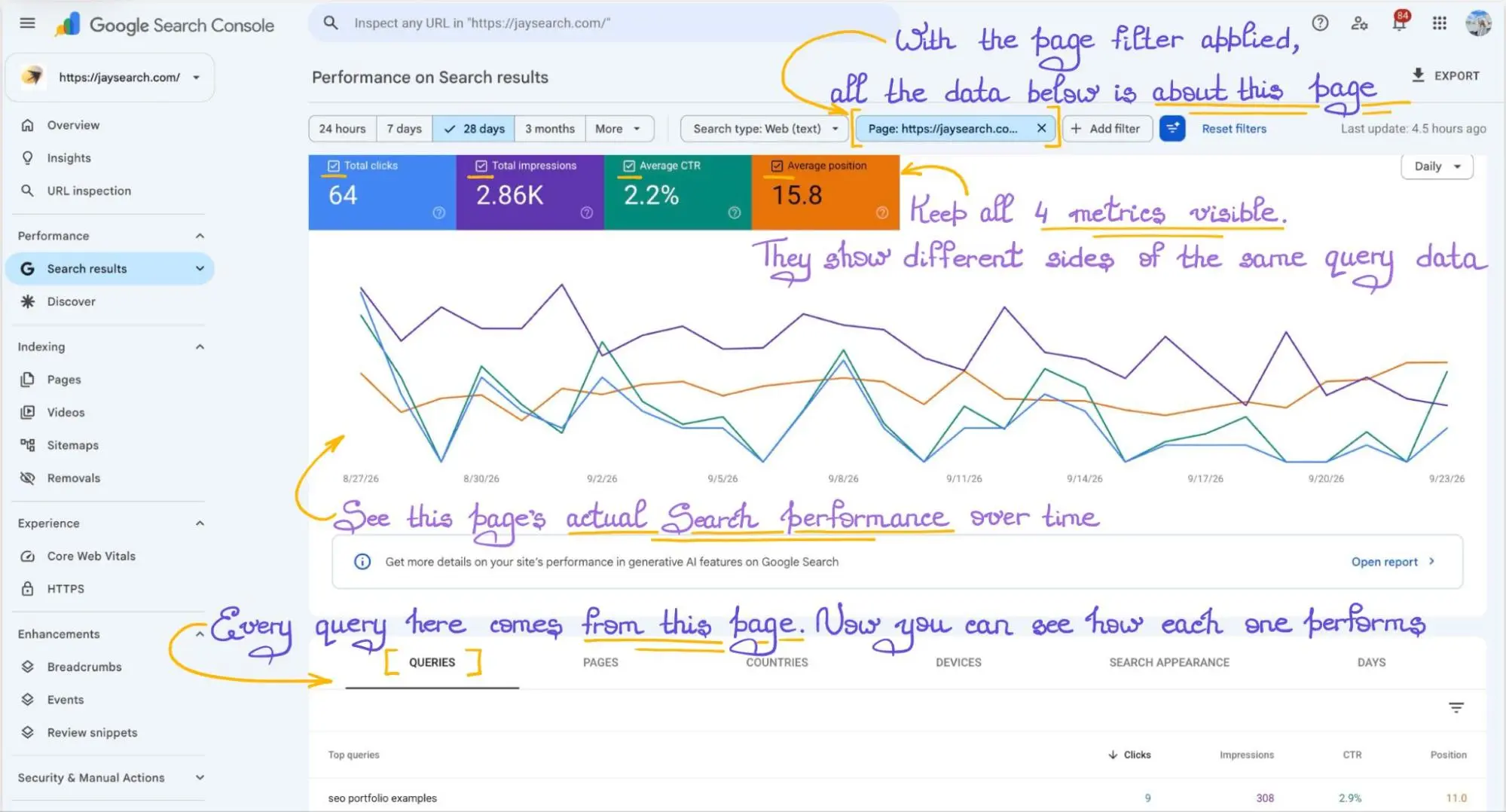
The site-wide query list cannot produce a decision. Decisions happen at the level of one URL and one intent, so that is where the filtering starts.
- Open Performance → Search results and switch on Clicks, Impressions, CTR and Average position — the last two are off by default.
- Go to the Pages tab and find the URL you care about. For one page, match the exact URL where the interface allows it; for a whole section, use the URLs containing filters with a stable fragment of the path.
- Click the URL. The filter now applies to the entire report, including the chart.
- Switch to Queries. Everything listed now belongs to that page.
- Set the date range deliberately. The report may open on a wider default window, and our working starting point is roughly the last month for the current picture — long enough to smooth out a bad week, short enough to show what is happening now.
If the Branded / Non-branded filter is available for the property, start there — it’s a built-in way to split branded from non-branded queries without building your own pattern. Where it isn’t available, or you need a custom brand definition, use a custom regex instead: query and page filters accept containing, not containing and custom regex in RE2 syntax, and regex matches partially by default (Google · advanced filtering and comparisons). Exclude your brand and its common misspellings, and what remains is the discovery traffic.
Knowing how to use Google Search Console for keyword research on an existing site is mostly this: narrow the data until every row on screen is a candidate for the same decision.
Step 2. A Google Search Console keyword research example: targeted query vs. actual leader
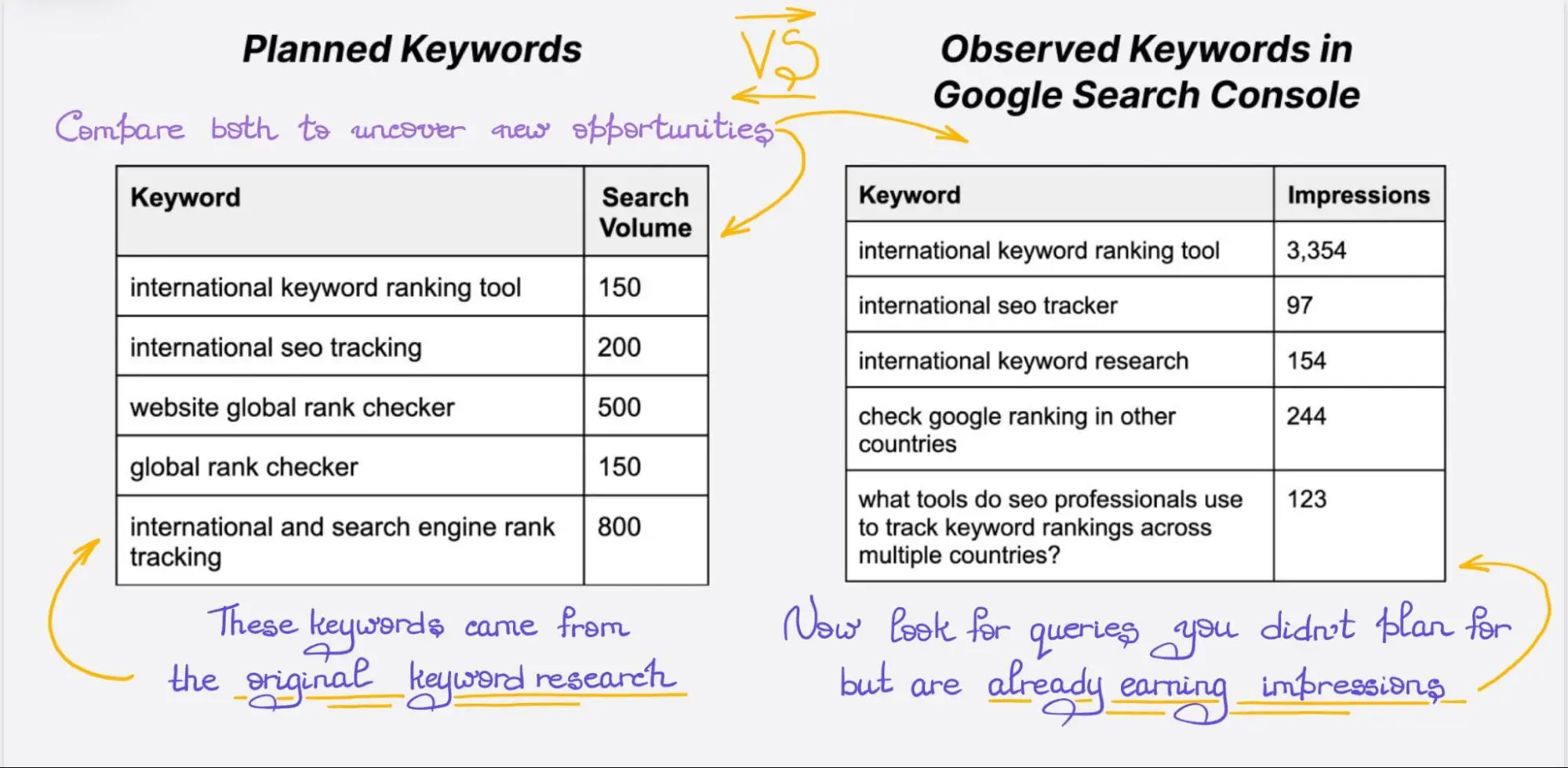
Now put two things side by side. First, the query the page was built for — it lives in your keyword map, or in the Ahrefs and Semrush project where the brief came from. Second, the query that actually leads the page by impressions and by clicks. Sort the Queries tab twice, because those two leaders are often different rows.
The standard advice is to pick the highest-volume term in a cluster and write to it. In practice, inside a cluster of five or six queries, the one that ends up leading on real impressions and clicks can be the variation that looked secondary during planning — a pattern we see often enough in client work to check for it. Third-party volume is an estimate produced on a delay and averaged across the market; your Queries tab is a record of what Google matched to your specific page. When they disagree, the second source is the one describing your situation.
Here is the shape of the comparison on a real page type. A guide published around customer onboarding software keeps under-performing for that head term while customer onboarding tools for SaaS takes most of its clicks. Before touching anything, compare four things:
- the job the searcher wants done, stated in plain words;
- the format that normally answers it — guide, landing page, comparison, template, glossary entry;
- where the phrase appears on the page: title tag, H1, H2s, the opening paragraph, image alt text;
- whether another URL of yours already collects impressions for that query.
The last point is the one people skip, and it is also the reason for a warning. You will read elsewhere that once the on-page terms match the query, rankings will inevitably rise. Nobody can promise that. Aligning a page with the query it already earns impressions for is a hypothesis with decent odds, and Step 3 is how you test it instead of assuming it.
Step 3. Decide whether to retarget the page.
Retargeting a page means rewriting the part of it that tells Google and the searcher what the page is about. Before touching anything, two questions have to be answered in order: does the demand actually persist, and does retargeting even make sense for this query.
3.1. Check that the demand is long-term, not a spike
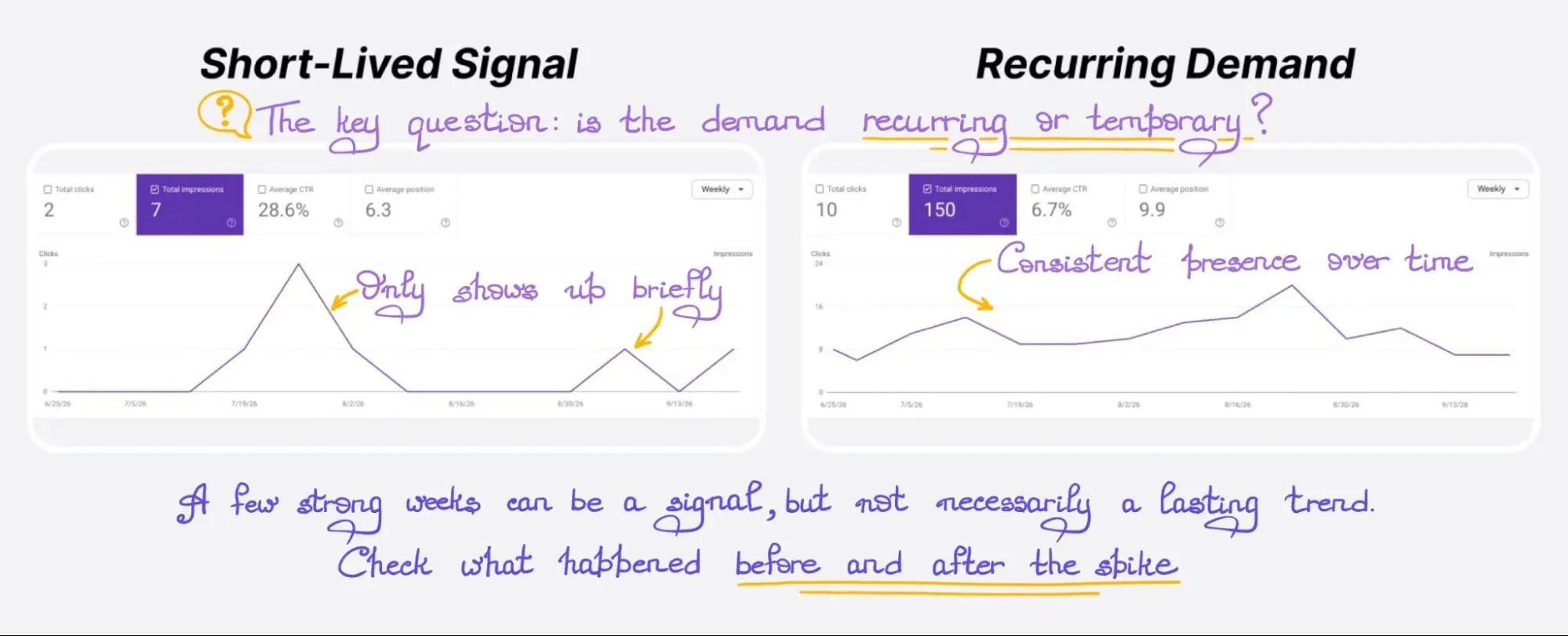
Filter the report down to that single query — one query, the same page — and stretch the window. Our working heuristic is three to six months before any lasting content decision; it is a team convention, not a Google rule. Switch the chart to weekly or monthly granularity, which removes the day-of-week pattern that makes short comparisons look dramatic.
You are reading one thing: does the query keep returning. Rising, flat and slowly declining are all workable answers. A block of impressions confined to a few weeks and nothing before or after is a different answer, and evergreen pages should not be renamed for it.
Rebuilding a title and snippet on seven days of data is the most common version of this mistake. Seven days is enough to notice something; it is not enough to change the label on a page that took a month to write.
3.2. What retargeting actually changes
Retargeting means the page keeps its subject and changes its framing: the title tag, the H1, the opening paragraph, the emphasis in the body and usually two or three H2s. Preserve the parts of the page that support its established intent and existing query set unless you have a reason to change them.
It helps to know how Google builds the blue line in the results. The <title> element is an important input, but Google also draws on the visible page title, the H1, prominent on-page text, og:title and anchor text pointing at the page, and it will rewrite a title it judges inaccurate or boilerplate (Google · control your title links). The same documentation is explicit about timing: after you edit, Google has to recrawl and reprocess the page, which can take anywhere from days to several weeks.
One case from our own work, kept deliberately unquantified because the export is not published: a guide built around a planned head term sat below the first screen for it, while a longer variation we had filed as secondary became the page’s leading query by clicks. We isolated that variation, confirmed it held across several months, then rewrote the title, H1 and opening section around it and left the structure of the body alone. Nothing happened on the day of the edit. The new title link appeared once Google had recrawled and reprocessed the page, and the phrase people were actually typing became the phrase the result advertised.
Our working hypothesis is that better query-to-page alignment can help twice: first by making the page’s subject unambiguous, then by making the result easier for the right searcher to recognise in the SERP. Google does not document that as a guaranteed two-stage ranking mechanism, and Google does not document raw CTR as a direct, standalone ranking factor either, so we would not attribute a ranking change to CTR alone — plan the change as a test with a baseline. Retargeting is easier to judge when you can see the query’s history next to the change you made — that is what the historical rankings view in JaySearch is for.
3.3. When to build a separate page instead
The fork is intent, and it is simple to state. Same intent, different wording — retarget the page you have. Different intent — publish a new one and leave the original alone.
A product page collecting impressions for customer onboarding checklist is the second case. The searcher wants a list they can work through today; the page wants to sell software. Rewriting the product page around the checklist damages a commercial asset and still answers the query badly. A separate checklist resource, linked from the product page, does both jobs.
There is one more constraint before you commit. Do not retarget a page for a query that another of your URLs already earns impressions for, unless you have decided to demote that other URL on purpose. Otherwise you are building cannibalization by hand, and Step 4 becomes a problem you created.
“The first thing I check is the window. A query can lead the last seven days because of one short spike, so changing the title that afternoon would be premature. I isolate the query and look across several months. If the pattern does not persist, I leave the page’s main target alone.”
Step 4. Read cannibalization before you act on it
Cannibalization is easy to see and easy to misread, so the check happens in two parts: who shares the query, and whether that sharing is actually a problem.
4.1. How to check which pages share a query
Run Step 1 backwards. Filter the Performance report by the query — exact match — and switch to the Pages tab. What you get is every URL on the property that received impressions for that query in the selected period, with clicks and impressions attached.
The Pages tab is useful for identifying query-to-page overlap, but it is not a complete duplicate-URL diagnostic, because Search Console normally consolidates performance data under Google’s selected canonical URL — for technical duplicates, cross-check with URL Inspection, the Page Indexing report, or a crawler.
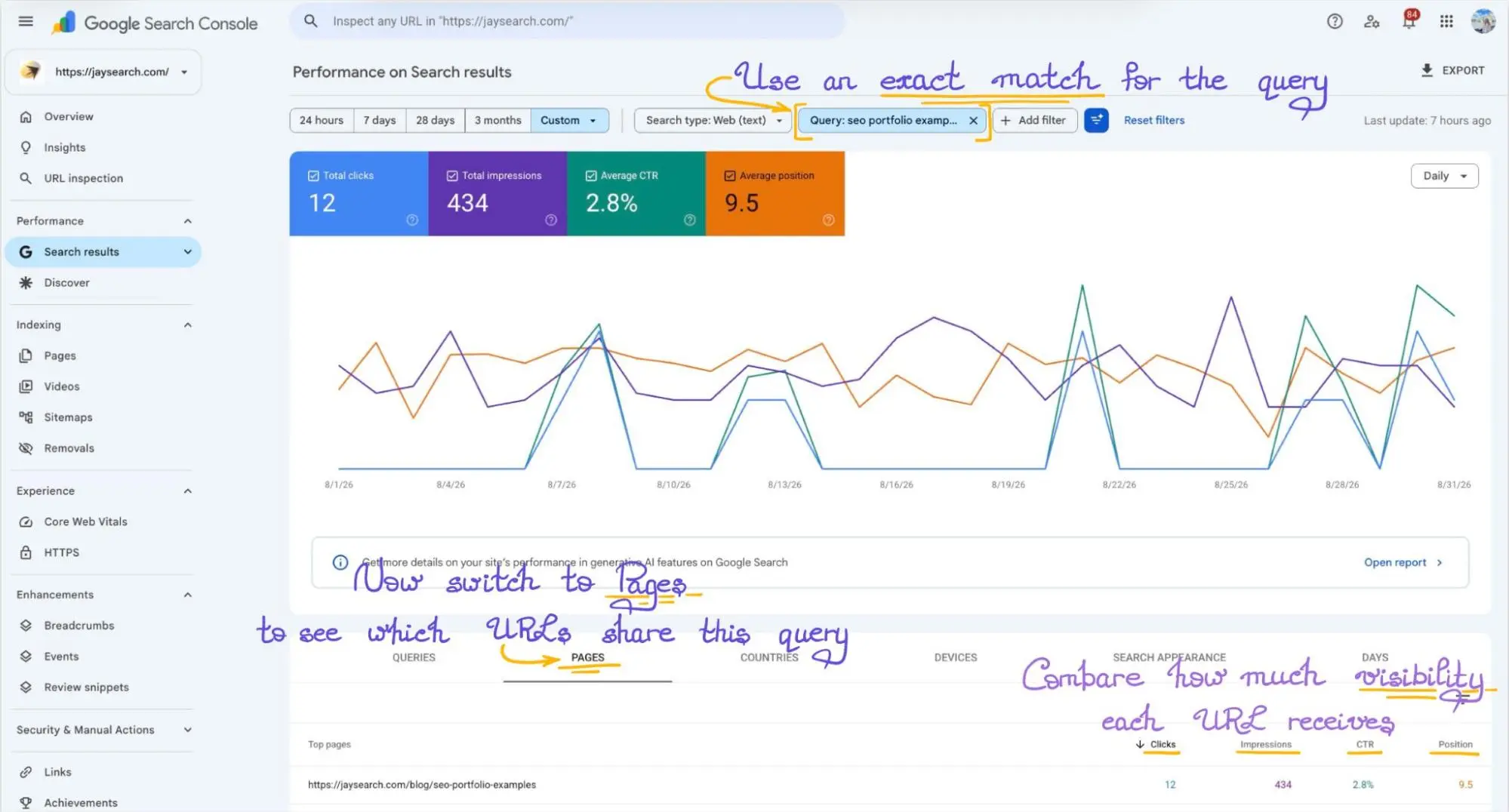
Read that list with the aggregation caveat from earlier in mind. Property-level average position reflects your top-ranking result for the query, page-level position reflects a single URL, so the two numbers are not interchangeable and the difference between them is not evidence of anything by itself (Google · about Search Console data). Before you call two URLs competitors, confirm which view you are reading.
4.2. Two signals that tell a problem from normal behaviour
Share of impressions. If one URL holds the overwhelming majority of impressions for the query and the others pick up scraps, that is normal behaviour on a large site. If one URL consistently receives most of the impressions and others receive only occasional visibility, the pattern alone isn’t evidence of harmful cannibalization. We deliberately avoid publishing a percentage threshold here — the shape of the distribution is the signal, and any number we give you would be a JaySearch convention dressed up as a rule.
Alternating lead. Put clicks or impressions for that query on the chart broken down by page and look at who leads over time. A single handover after you published something new is expected. Repeated alternation, with neither URL holding the query’s visibility, is a reason to investigate — especially when both pages serve the same intent. On its own, alternation is a diagnostic signal, not proof of lost traffic; pair it with the clicks trend and with an honest read of whether the two pages answer the same question.
Co-ranking is often the healthy outcome. For a query like B2B reporting software a commercial landing page, a comparison article and a downloadable buyer’s guide can all appear over a month, each matching a different segment of intent. Nothing needs fixing there.
Two genuinely similar articles are the case that does. How to create an SEO report and SEO reporting guide serve one informational intent with two documents, and the lead keeps switching. That is when you choose a primary URL and act — differentiate the intents, consolidate with internal links, or merge and redirect.
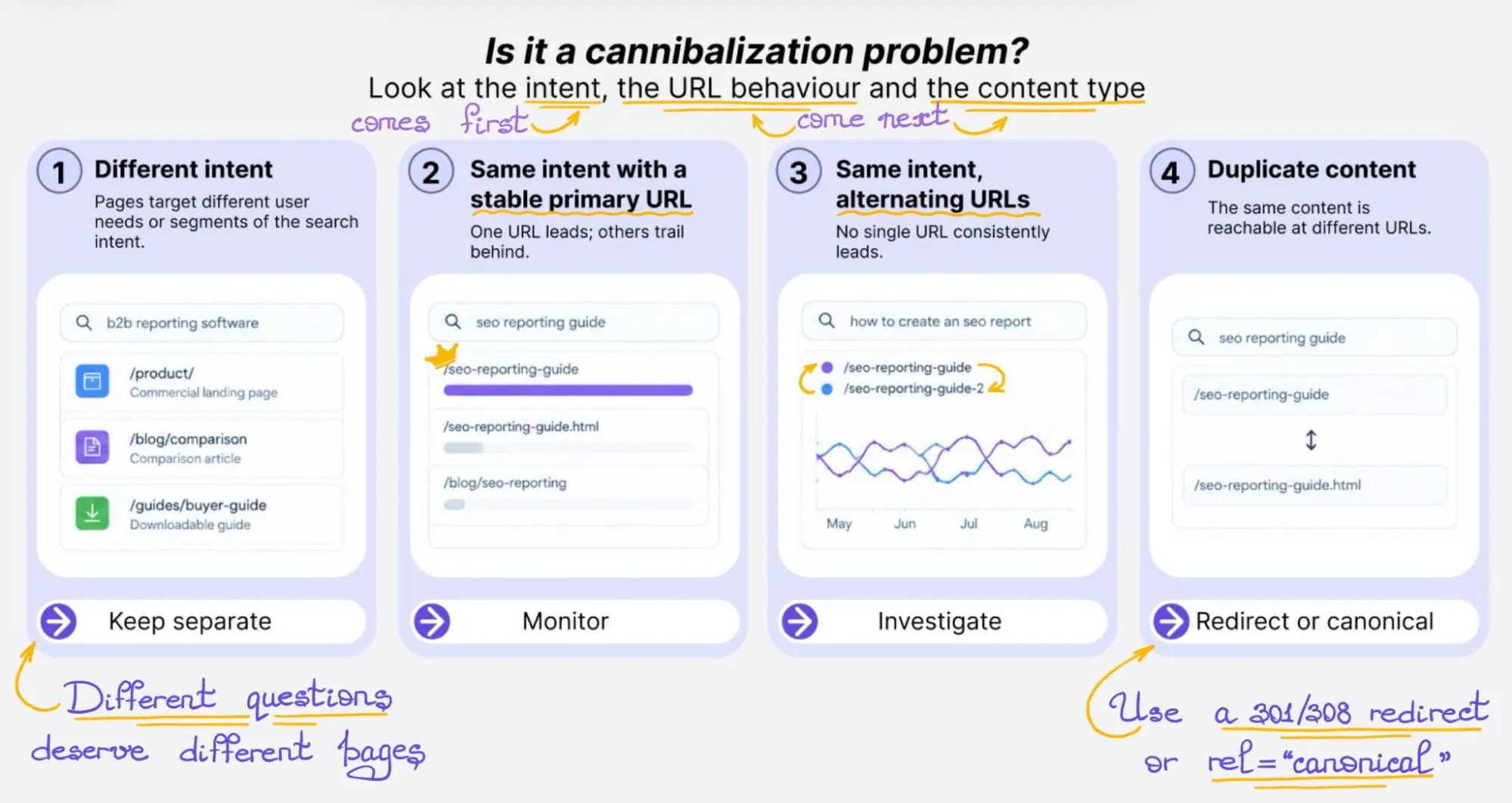
Finally, separate the content problem from the technical one. If the same document is reachable at /seo-reporting-guide and /seo-reporting-guide.html, you are not looking at two competing pages; you are looking at duplicate URLs — and because Search Console usually consolidates performance data under one canonical URL, the Pages tab may not show both variants as separate rows, so confirm with URL Inspection or a crawler before you conclude the duplicate is (or isn’t) indexed.
Redirects and rel=“canonical” are both strong canonicalization signals, and for a URL that has been permanently replaced Google recommends a server-side permanent redirect — 301 or 308, with 302, 303 and 307 reserved for temporary moves (Google · consolidate duplicate URLs; Google · redirects and Google Search). Blocking one version in robots.txt is not canonicalization. One document, one URL, and internal links pointing at it.
Step 5. Make it a monthly routine, not a one-off audit
A single audit describes one month. The query mix on an important page shifts as you publish neighbouring content, as competitors move, and as Google re-evaluates what your site covers — which is why the interesting rows in a February export are rarely the interesting rows in June.
Our practice is narrow on purpose. Pick the pages that matter to the business by inbound leads or signups rather than by traffic, and look at them every month or two: what changed in the structure of queries they rank for, which query leads now, whether a new adjacent phrase has appeared. Monthly is a team convention, not a universal frequency — in fast-moving niches, or right after a large publishing push, we look sooner. Doing this manually across dozens of pages becomes difficult to maintain consistently.
Three things need to survive between iterations:
- the query groups you selected, so you compare the same shortlist rather than re-reading a fresh export;
- the target URL for each group, which is what makes cannibalization visible at all;
- the date of every change you made to the page — without a change log, a position chart explains very little.
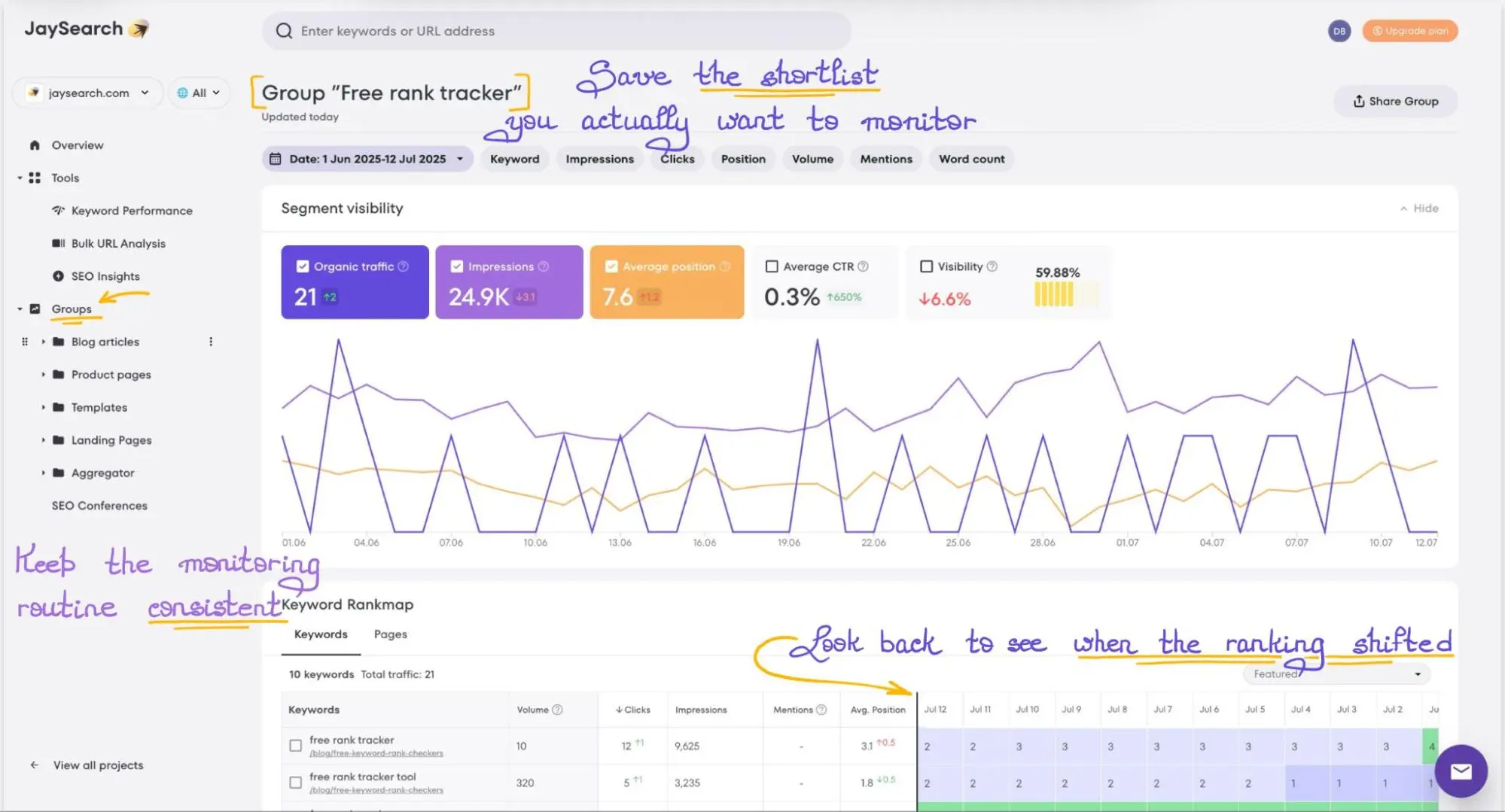
If you want a lightweight way to watch the shortlist before committing to a paid workflow, our comparison of free keyword rank checkers covers the practical trade-offs. Keeping the shortlist somewhere it updates on its own is the difference between a routine and a good intention: in JaySearch you group the queries you picked and check the group instead of the export.
Tracking the queries you decided to keep
By this point the research has produced something specific: a shortlist of queries, the URL each one belongs to, and a decision for each — retarget, leave alone, build a new page, or fix a duplicate. Those decisions have to live somewhere and be revisited. Doing it by hand across a few dozen pages, once a month, is a habit that’s easy to let slip.
That is the gap JaySearch is built for. You connect a Google Search Console property, and it imports the pages and queries that property has data for, with clicks, impressions, CTR and average position. From there the workflow is the one described above: filter pages and queries, save the ones you decided to keep as tracking groups, and watch the historical rankings of those groups instead of rebuilding an export. Its SEO Insights view surfaces core, long-tail and untapped queries — useful as a prioritisation shortcut, provided you still check recurrence, intent and query-to-page fit before acting on a row.
Two honest qualifications. JaySearch states that its ranking data comes directly from a connected Google Search Console property. When comparing the two, use the same property, date range, country, search type and page/query scope, since differences in filtering and aggregation can change the numbers — and the same underlying limits apply: anonymized queries, aggregation rules and all. And it does not replace Ahrefs or Semrush where you need queries your site has no visibility for yet; a term with no impressions has no position to show.
A Starter plan is available at no cost, with one project and a small keyword and page allowance; the Growth plan adds daily updates and a longer ranking history. Capacity and prices change, so check the current plans and limits before you plan a workflow around either one. Everything above starts in the same place: Google Search Console for keyword research produces the shortlist, and something has to keep watching it after the export is closed.
Key takeaways
- A row earns a change when it recurs across months, already produces impressions for that exact page, and carries an intent you can state in one sentence.
- Impressions are a record of your visibility, not a demand estimate. Volume from a keyword tool answers a different question and belongs in a different column.
- Same intent and a consistently stronger query can justify retargeting the existing page. A different intent usually calls for a separate page, leaving the original commercial page intact.
- Two URLs on one query is normal when one of them holds the visibility. Investigate when the lead keeps switching and both pages answer the same question.
- One document reachable at two URLs is a canonicalization job — redirect or canonical — and no amount of rewriting will fix it.
- If the site has no query history yet, start with third-party keyword data and SERP research, then bring GSC into the workflow as impressions accumulate.
FAQs
Is Google Search Console a keyword research tool?
For a site that already receives impressions, yes. It reports the real query-to-page relationships Google has created for your property, with clicks, impressions, CTR and average position. It is not a market research tool: it cannot show terms you have never appeared for, and it does not generate ideas from scratch. For that part of the job you still need Ahrefs, Semrush, Keyword Planner or Google Trends.
Can I see search volume in Google Search Console?
No. The closest metric is impressions, which counts how many times your page appeared in results for a query, according to Google’s counting rules. Impressions depend on your visibility, position, country, device and search type — not on total market demand. Treating 500 impressions as “500 monthly searches” compares two different measurements and will mislead your prioritisation.
How far back does Search Console keyword data go?
Performance data covers up to 16 months. That’s enough to compare a query year over year once, and not enough to study multi-year seasonality. If long history matters to your reporting, export and store the data regularly — either manually or through the Search Console API — or use a tool that persists the history, because the oldest month drops off as a new one arrives.
Why doesn’t Search Console show all my queries?
Three reasons stack up. Rare queries are anonymized to protect user privacy and never appear on the Queries tab. The table is capped at 1,000 rows. And filtered totals may not add up to unfiltered ones for the same period. A missing row is not evidence of zero impressions — it is a gap in what the report is allowed or able to display.
Google Search Console vs Ahrefs — which data should I trust?
Both, for different questions. Search Console tells you what happened to your property: which queries it appeared for, and how those appearances performed. Ahrefs and Semrush estimate the market — demand, competitors, and terms you have no data for. When they disagree about a page you own, your property’s data describes your situation and the estimate describes an average.
How often should I review query data for a page?
Monthly, or every other month, for pages that matter to the business — that is our working cadence, not a Google rule. Faster niches and heavy publishing schedules justify a shorter cycle; a stable evergreen library rarely needs one. Whatever the interval, keep the same query groups and log the dates you changed the page, or the chart will not explain what you are looking at.