.webp)


“Is my SEO strategy working?” — This is the question that keeps website owners, marketers and agency owners tossing and turning at night. To find an answer, we have to do more than look at today’s search rankings and give ourselves a thumbs up or thumbs down.
All that does is tell us what’s happening right now. If we want to see the big picture, we have to dig a little deeper to spot trends and find out why things are happening.
Historical keyword rankings will provide us with perspective and give us the information we need to identify what we did right and what we did wrong. Variables like algorithm updates, competitor website redesigns and seasonal search trends combine to make SEO a constantly shifting landscape, so we have to take a birds-eye view if we want to identify the patterns that will allow us to make sound decisions and create accurate forecasts.
Is a drop in the rankings a sign of terminal decline, or is it a bump in the road that’s happened before, will happen again and won’t last very long? That’s the kind of question this article will help you answer.
What is Historical Keyword Rankings Data?
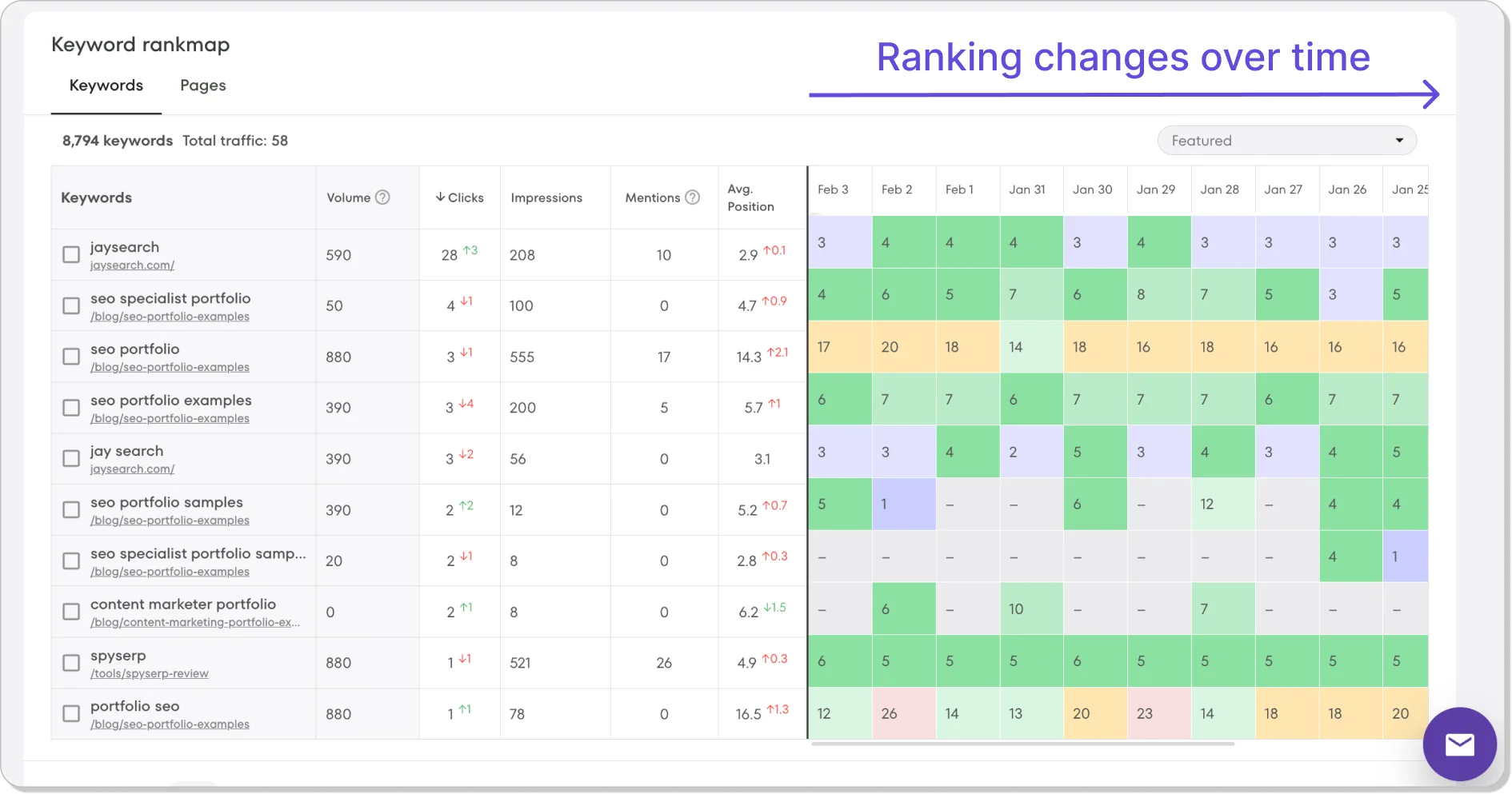
Historical keyword ranking data is information that tracks how well a website has performed in online search results over time. Instead of providing a snapshot of how a website is performing on a given day or at a particular moment in time, historical keyword data will reveal when a page first appeared in search results, how quickly or slowly it climbed up the rankings and when its progress came to a halt and decline set in.
Keyword ranking histories are like movie trailers. They tell us how a website’s SEO journey has unfolded, and they give us a pretty good idea of how good or bad that journey has been. When the big picture starts to emerge, you’ll be able to answer questions like:
- How long will it take before my keywords reach page 1?
- How will algorithm updates affect my rankings?
- Do my keywords perform better at certain times of the year?
- How volatile are search engine results?
- Have content changes led to a rise or fall in the rankings?
- Do the steps my competition takes influence my results?
Without historical keyword data, your answers to these questions will be based on little more than guesswork and intuition. When you have a historical perspective, you’ll make smart decisions based on observable trends and patterns. You won’t overreact to seasonal dips because you’ll see them coming, and you’ll be prepared for any questions your team or clients might ask.
What Can Your Keyword Ranking History Tell You About Your Future?
Keyword position history tells us what happened in the past, and it can also provide insights that we can use to plan for the future.
SEO novices react to things that happen to them. Gurus learn from yesterday so they can predict what will happen tomorrow. As we grow and learn new skills, we spend less time cleaning up mistakes and coping with emergencies and more time thinking about ways to maximize opportunities that we know will come. This is why SEO experts spend so much time poring over historical data.
When you start analyzing historical website data, you’ll notice that competitive keywords climb the rankings far more slowly than niche and long-tail keywords. Digging into this data will allow you to predict with reasonable accuracy how long it will take your new keywords to find their way to the top of online searches. Your prediction will be based on established trends and not gut instincts, and your team or clients will sense your confidence.
Getting some historical perspective will also make your life less stressful. You won’t panic when your keywords plummet after an algorithm or content update because you’ll know it’s just a temporary blip, and you’ll instantly recognize outlier problems that require immediate attention.
When you notice how tweaking one keyword led to improved rankings for related terms, you’ll be able to predict gains for entire keyword groups. All of this will allow you to set realistic performance goals based on established data, and you’ll be able to calm your team or clients down when setbacks set their nerves on edge.
Key Insights Hidden in Your Keyword History
Everything that happens online leaves an electronic fingerprint behind, which means SEO professionals have vast amounts of data available to them. This can lead to situations where insights are missed because they are obscured by extraneous information.
That’s why studying historical keyword rankings is a bit like panning for gold. To find the nuggets you’re looking for, you’ll have to sift through a lot of information. Here are some of the insights you’ll find hidden in your keyword history:
- The impact of algorithm updates: Google rolls out about 500 algorithm tweaks each year. Some of them are core updates that are announced in advance, but most are minor changes that SEO professionals only become aware of when they notice changes.
Armed with a long list of dates, you can check historical data to find out how algorithm updates affected your search rankings. Did your keywords fare better or worse? Were all of your pages affected or just certain kinds of pages? If your rankings dropped, how long did it take them to recover? - The impact of competitor actions: It’s always a good idea to keep an eye on what your competition is up to. If you know when a competitor first appeared in the search results, you can find out how quickly they climbed and whether or not their success came at your expense.
You could also take a peek under their hood to determine whether their climb was the result of engaging content, authoritative backlinks or intelligent schema markup, and that could help you to hone your site’s strategy and spot emerging threats before they eat into your hard-won gains. - Search trends: Some online trends like the seasonal uptick in searches for consumer goods during the holiday season are easy to spot, but others can be a bit more elusive.
People may search for road salt when heavy snow is expected and auto body shops in the days following a storm. Mother Nature doesn’t stick to a strict timetable, so you may have to do some detective work to figure out why some of your keywords had significant peaks and troughs.
If you do, you’ll be able to separate genuine upticks in interest from flash-in-the-pan search spikes. Once you’re able to do that, you won’t waste time fixing things that aren’t broken. - Content lifecycles: Even the best and most engaging content has a limited shelf life. If your rankings are slipping and you have ruled out algorithm updates, competitors and search spikes, there is a good chance your content has grown stale.
When you track keyword ranking history, you can figure out how long your content will stay fresh for. This will allow you to create a content maintenance and refreshment plan based on sound analytics that maximizes keyword performance. In short, you’ll stop publishing more and start publishing smarter.
How to View Your Keyword History
We’ve established that studying your keyword ranking history can provide you with valuable insights, identify long-term trends and tell you where things went wrong, but how do you actually go about finding this valuable information?
You could do it the old-fashioned way and grab a pen and notebook, open up a spreadsheet and start running internet searches, or you could choose from a wide variety of slick SEO tools that will do the heavy lifting for you.
Some of these tools are free, and some you will have to pay for. Let’s take a look at some of the most popular methods so you can decide which approach will work for you.
Manual Tracking

Tracking your keyword histories manually won’t cost you any money, but it will take up a lot of your time. This approach involves running web searches and keeping track of the results in a notebook or on a spreadsheet.
If you decide to try manual tracking, make sure you use private or incognito mode when you run your searches. That will make sure that your results aren’t being influenced by your previous search history.
Manual tracking is not recommended by SEO experts because it provides incomplete information. It won’t tell you how your keywords perform in other parts of the country or overseas, and it won’t reveal how you rank on different types of devices.
You could run desktop, laptop and mobile searches from different locations using a VPN, but that will just make a time-consuming chore even more of a hassle.
The Wayback Machine
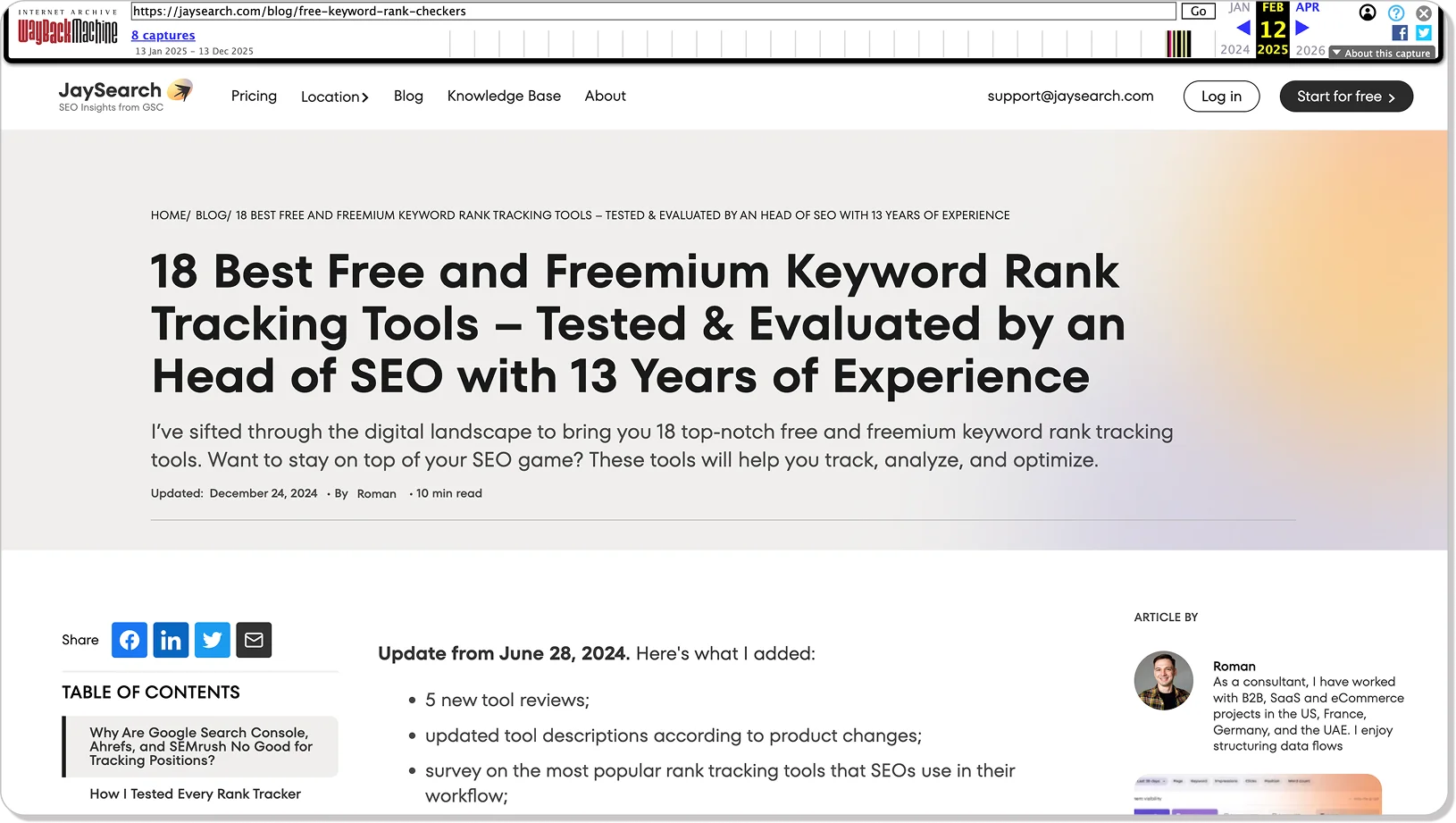
The Wayback Machine was updated recently to provide SEO professionals with more useful tools, but it’s still far from perfect. The popular internet archive is slow and clunky, and websites that don’t generate a ton of traffic are only indexed a few times each year.
What the Wayback Machine can do is show you what a website looked like at a certain point in time. If you notice that one of your competitors was getting steady results and then started to fly up the rankings, you can visit the Wayback Machine to find out what changes were made to their website. Did they refresh their content, change their CMS, remove low quality links or completely redesign their site? The answers to these questions could be very useful.
The Google Search Console
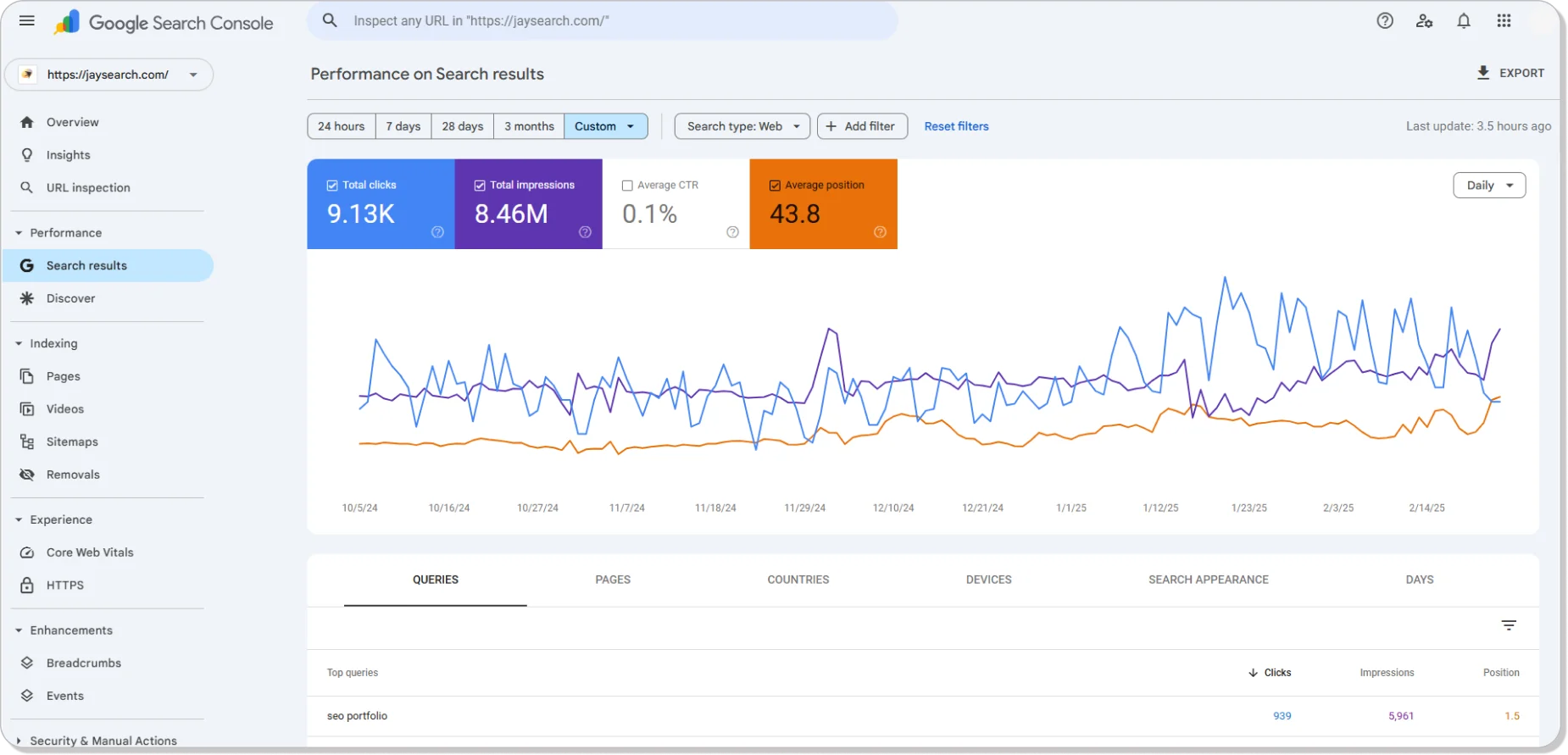
The Google Search Console is an extremely popular SEO tool for two very good reasons. It uses the best data in the business, and it’s free. Once you’ve set up Google Search Console and verified ownership of your domain, you can head to the “Performance” section and click on the “Search Results” tab to track your keywords.
Clicking “Average Position” will show you how your website ranks for specific search terms, and selecting “Queries” will create a list of keywords your website is ranking for. Clicking on any of these keywords will open a graph that shows performance over time. You can’t choose which keywords you want to track and you can only see data from the last 16 months, but that doesn’t stop Google Search Console from being a great way to get started with historical keyword position tracking.
SEO Rank Checking Tools
Most SEO products and all SEO rank trackers include keyword rank history tools. The cost of using these tools runs from a few dollars to several hundred dollars per month, so it would be wise to do some homework before you sign up.
Many of the more popular options offer free trials, and some even offer a free version of their tool. These free options are designed to provide a gateway to paid subscription packages, so they rarely provide much functionality.
If you are willing to pay, you’ll find tools like competitor analysis, social media tracking, desktop and mobile tracking, local, state and international tracking and customizable reports.
How to Check Website Ranking History in JaySearch
JaySearch is an affordable, accurate and very easy to use rank tracking tool. JaySearch has carved out a niche in a very competitive market segment by taking data from the Google Search Console and making it far more useful.
You can choose which keywords you want to track, and you can create comparison reports for devices, countries, pages and keywords with just a few clicks.
The free version will allow you to track 25 keywords and 10 pages, but it will only give you seven days of historical data. That’s not a problem though because the Growth Package only costs $19 per month. The Growth Package will give you 480 days of ranking history for up to 1,000 pages and up to 10,000 keywords, and that’s more than enough data to hone your SEO strategy.
Here’s a step-by-step guide that will show you how easy it is to check historic SEO data using JaySearch.
Step 1: Open Your Project
When you start using JaySearch, you’ll create projects for the URLs you want to track. To start tracking your keywords, all you have to do is open one of these projects up.
When you do, you’ll see a list of the pages you added to the project along with each page’s top keyword. There will also be columns that tell you how many times the page has appeared in search results, how many times the link was clicked and the number of keywords the page ranks for.
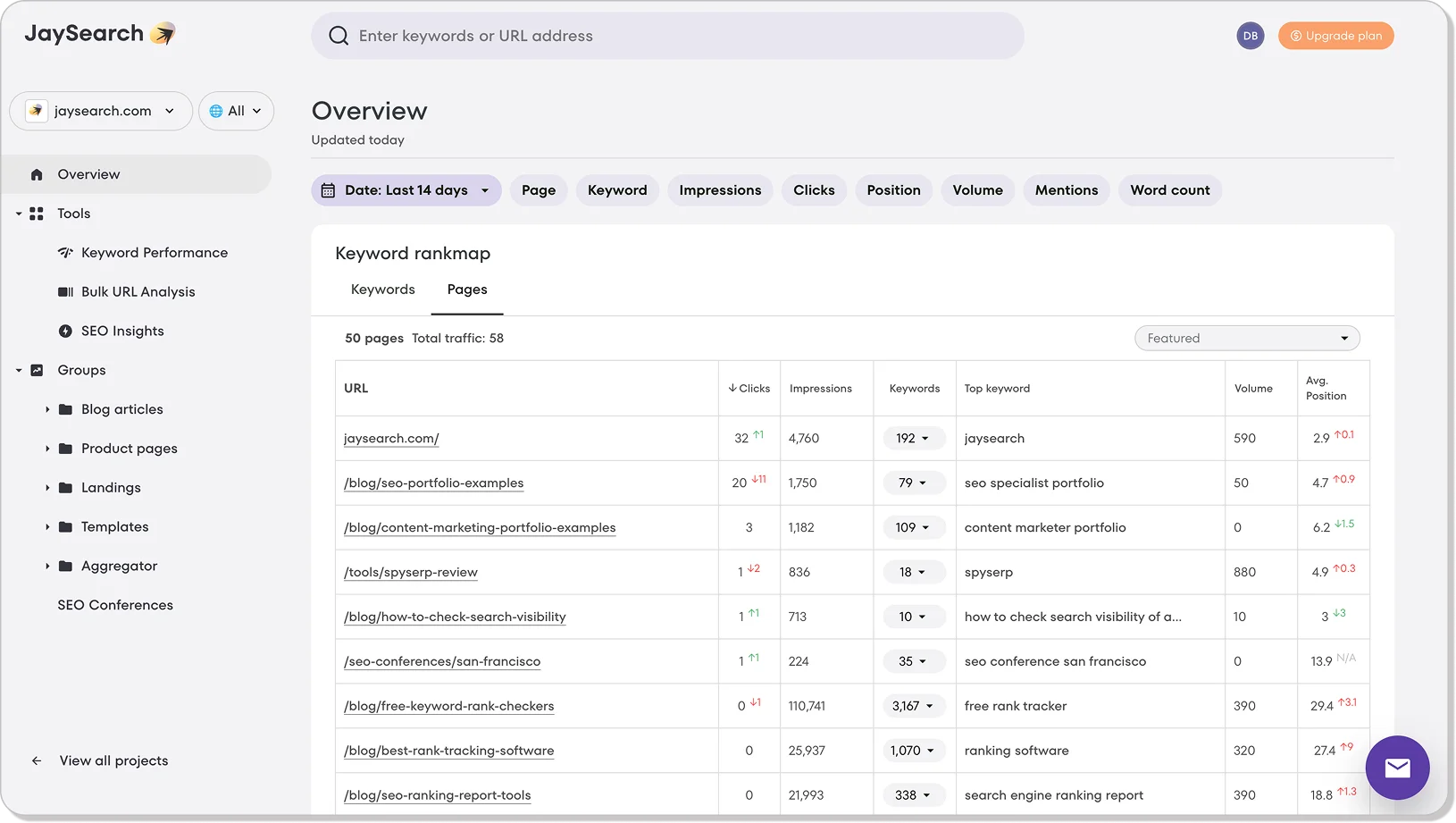
Step 2: Click on the Number in the Keyword Column
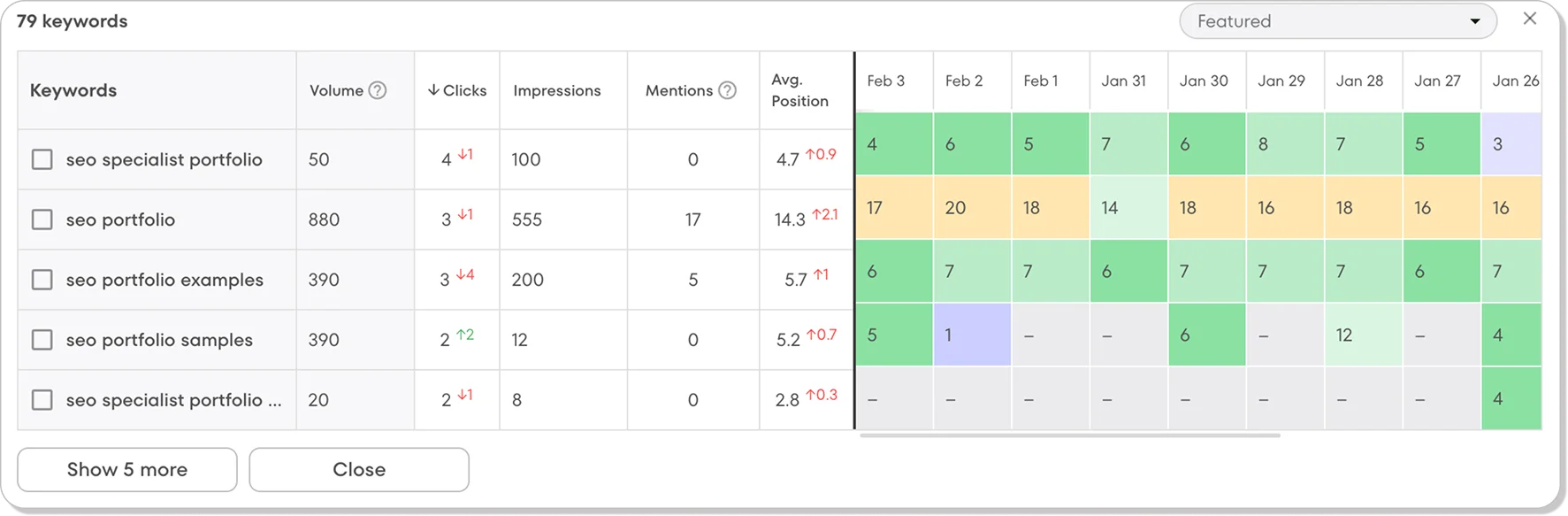
When you click on the number in the keyword column, the dashboard will show you how each keyword has performed during the last month. The dates are presented in a grid just like a calendar, and they are color coded so you’ll be able to get a pretty good idea of what’s going on with a single glance.
To the left of the color-coded grid, there are columns that provide information about impressions, clicks and search volume. If you want to see more recent data, all you have to do is just scroll to the right.
Step 3: Check the Entire Website
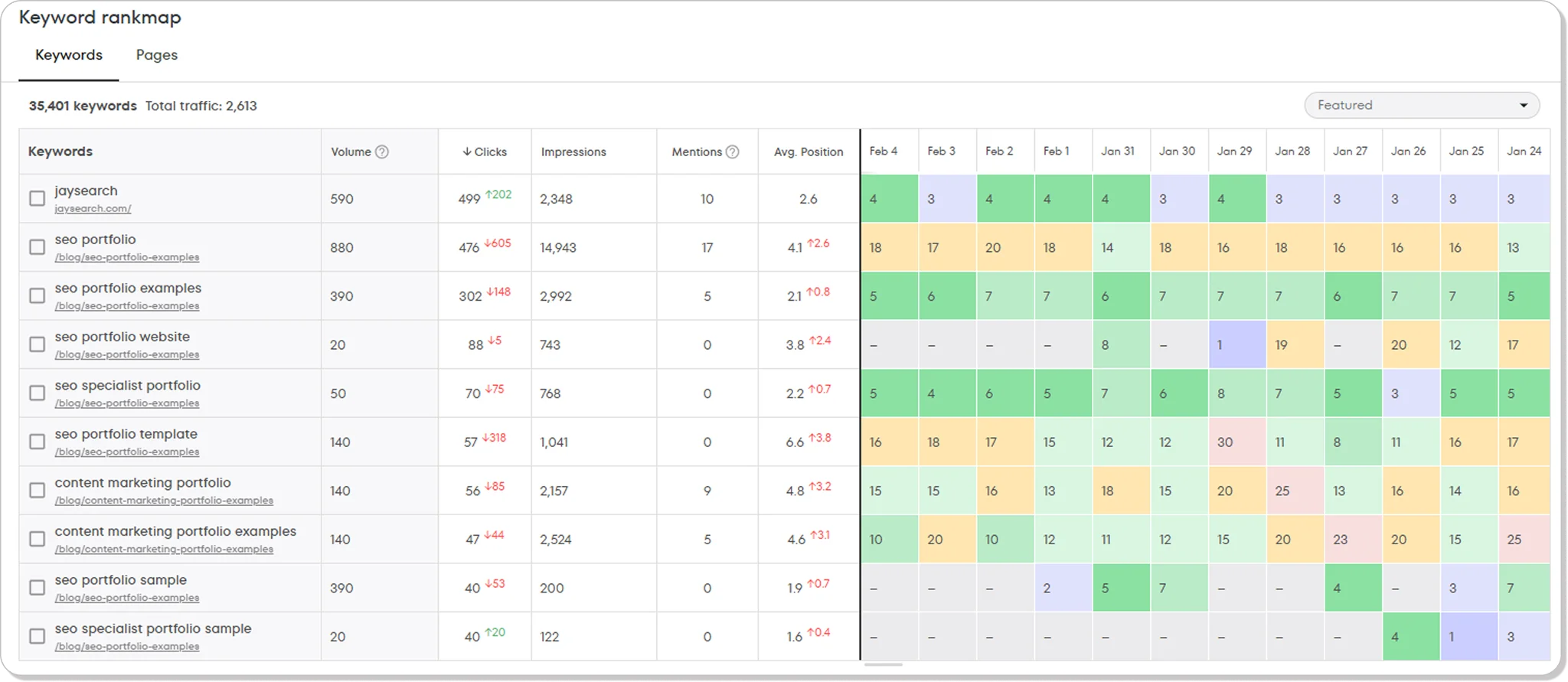
JaySearch lets you check keyword ranking for an entire site as well as individual pages. To access this information, you just have to choose the “Keywords” tab. This will bring up another page with a color-coded grid, but the left side of the page will have a list of pages and keywords.
Step 4: Filter Keywords by Position
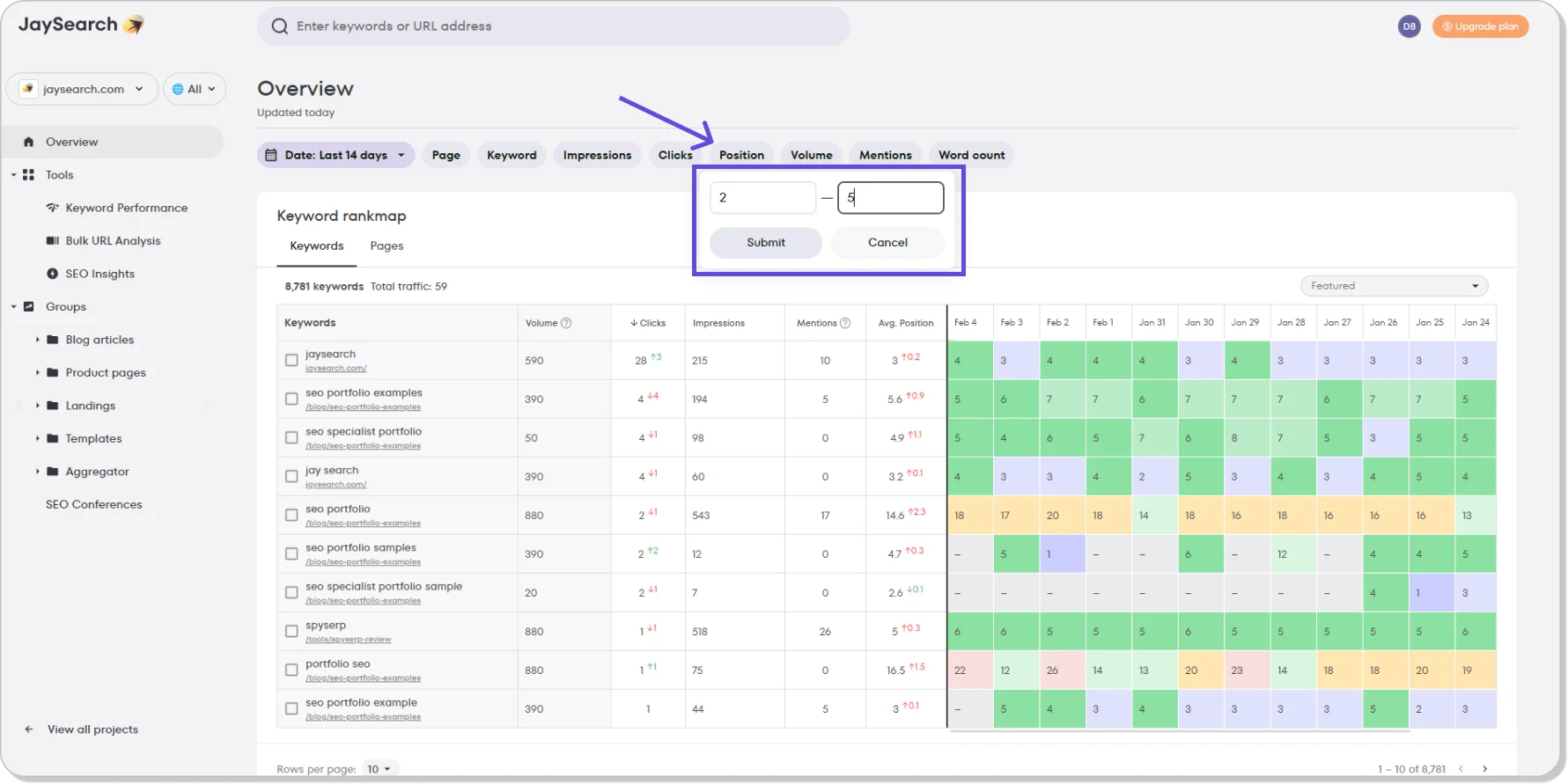
If you want to know which of your keywords have reached the top positions on Google, you can use JaySearch’s Position Filter. It will only take a moment because all you have to do is enter the positions you are interested in.
If you want to know which of your keywords are in positions one through five, just enter “1” and “5” in the Position Filter input boxes and click “Submit.” This will bring up a list of all of your keywords with positions between one and five.
Step 5: Explore Other JaySearch Features
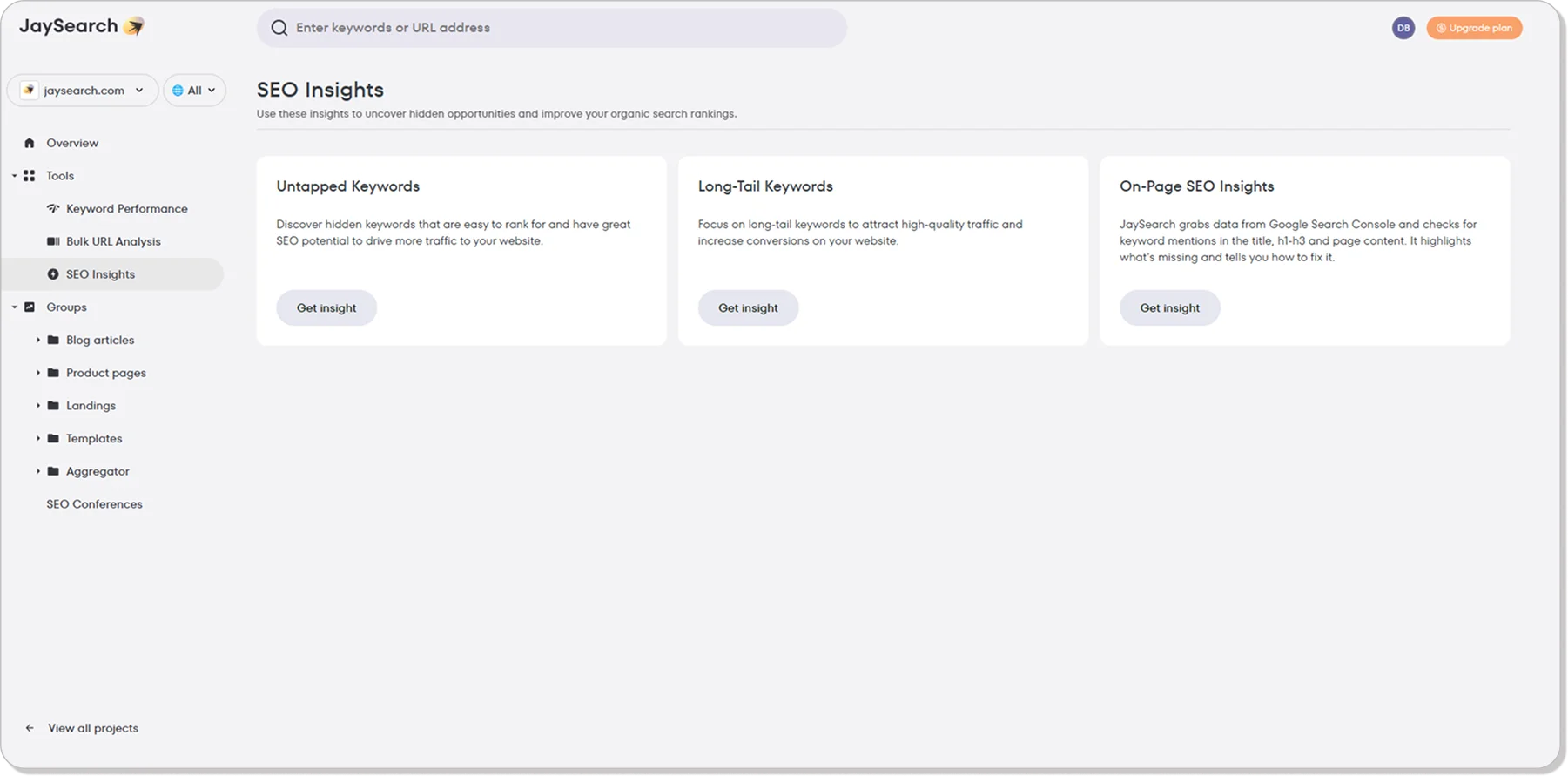
Once you’ve got the hang of tracking keywords and are comfortable using the platform. You can explore some other very useful JaySearch features. You could search for hidden keywords, find long-tail keywords and discover new content ideas. You can also create reports that you can share with your clients or team.
Step 6: Take Advantage of JaySearch’s Free SEO Consultations
JaySearch is easy to use because the dashboard is so intuitive, but we all need a little help every now and then. With that in mind, JaySearch offers its paid and free subscribers up to two hours of free SEO consultation each week. If you’re new to SEO or want a few pointers to help you get the most out of the platform, these free consultation sessions could be really useful.
How to Use Historical Data to Optimize Your Content
When you track historical rank by keyword, you can develop a proactive SEO strategy that anticipates rather than responds to seasonal search trends, algorithm updates and other disruptions.
Current rankings let you know what’s going on right now, but they don’t give you the big picture. When you augment current data with historical keywords and rankings, you’ll be able to identify opportunities that would otherwise have been missed, refresh your content before it gets stale and take corrective action before your website’s numbers begin to plummet.
Here are some of the ways you can use historical data to optimize your online content:
- Prevent keyword freefalls: Keeping track of how your keywords perform over time will allow you to spot declines early and prevent them from turning into freefalls.
You’ll be able to pinpoint the cause of the decline by analyzing how other keywords are faring, and historic data will tell you when a blip becomes something to worry about. - Predict when content should be refreshed: When you track keyword position history, you’ll get a sense of your content’s life cycle. You’ll know how long it takes for your content to rank, and you’ll be able to predict when decline will set in.
This knowledge will allow you to develop a content maintenance strategy that schedules updates at just the right time. - Identify keywords with potential: All SEO professionals worry about missing out on opportunities. Arriving at the party just as everybody’s preparing to leave is nightmare fuel, but it’s a predicament that can be avoided.
Tracking historic website performance could help you to uncover opportunities, and some SEO tools have features that make it easy. JaySearch has a feature that identifies hidden keywords and tells you how well they are performing in search results. - Plan seasonal content: Identifying patterns and trends is one of the chief benefits of tracking historical keywords. If you notice that certain keywords become more popular at certain times of the year, you can create content designed to capitalize on the uptick in interest.
Noticing how seasonal trends affect some keywords more than others will allow you to hone your strategy even further. - Refine your strategy: Tracking your historical ranking data will allow you to evaluate how effective your SEO efforts have been in the past. When you have a clearer understanding of what worked and what didn’t, you’ll be able to refine your strategy and focus your efforts on tactics and techniques that will give you the best results.
- Anticipate algorithm updates: Core algorithm updates can change the search landscape significantly. When you know how these updates have impacted your rankings in the past, you’ll be better prepared to deal with them in the future.
This will allow you to cope when the goalposts are moved, and you’ll know what to say when your team or clients become panicked.
Smart Tips for Tracking Keyword Ranking History
SEO professionals often feel like they’re working in the dark. They have advanced tools at their disposal, but they can never be sure what tomorrow will bring. What we need is a light that can show us the way, and that’s just what historic ranking data provides.
Historians say that the past doesn’t repeat itself but it does rhyme, and the same can be said of online search results. What worked a year or two ago may not work today, but how it worked and for how long can provide us with useful insights.
Historic tracking data gives us a lot of useful information, and it can also be used to help us get a leg up on the competition. The things you can do to put keyword tracking data to good use include:
- Refreshing your content at the right time: Studying historic keyword performance will reveal how long it takes for your content to rise in the search rankings. You’ll also learn how long it will be before your content gets stale and starts to slip.
This data can be used to time new content in a way that keeps traffic steady and avoids dips. You can also give old content an SEO makeover with updates stats and new links. Old content can also be tweaked by adding keywords that are becoming more popular. - Focusing on evergreen content: News-based articles and pages can give a website a timely shot in the arm, but it’s evergreen content that keeps attracting visitors month after month.
Historic keyword position tracking will tell you which subjects keep people interested, and you can use that information to build article clusters that will provide the same kind of contents.
If product review, how-to guides or FAQs drive traffic to your site consistently, create more of them. - Analyzing the metrics that matter: The right keywords will get your website onto the first search results page, but it’s clicks that pay the bills. When you study historic keyword rankings, make sure that you also check other important metrics like clicks and bounce rates.
The Google Search Console will give you this information, but you won’t be able to pick your keywords. If you want to have more control, you can use a dedicated rank tracking tool like JaySearch. - Timing product releases for maximum impact: If you want to make the most of opportunities like the holiday shopping season, you will have to time your product releases for maximum impact.
If historical data tells you that it will take three months for your content to reach its peak, you should release it three months before Black Friday. Any sooner and your content could be running out of steam before the season is over, and if you wait too long you will squander a golden opportunity. - Finding treasure buried in the past: SEO professionals tend to live in the moment, and that’s not always a good thing. When you start to track website ranking history, you’ll come across keywords you are no longer using that once performed well. You may not know or remember why these keywords were dropped, but that doesn’t mean you can’t revive them.
Wrapping Up
If your SEO strategy makes you feel like you’re constantly playing defense, historical ranking data can change the game. The insights you find when you check past keyword performance can open up new opportunities and put you in control.
You’ll know when to refresh your content and how long it will take for your new keywords to rank, and you won’t be thrown into a panic every time a search engine releases a core update. You’ll identify trends and notice patterns when you check historic data, and your competition will never catch you by surprise again.
Ready to See the Bigger SEO Picture with JaySearch?
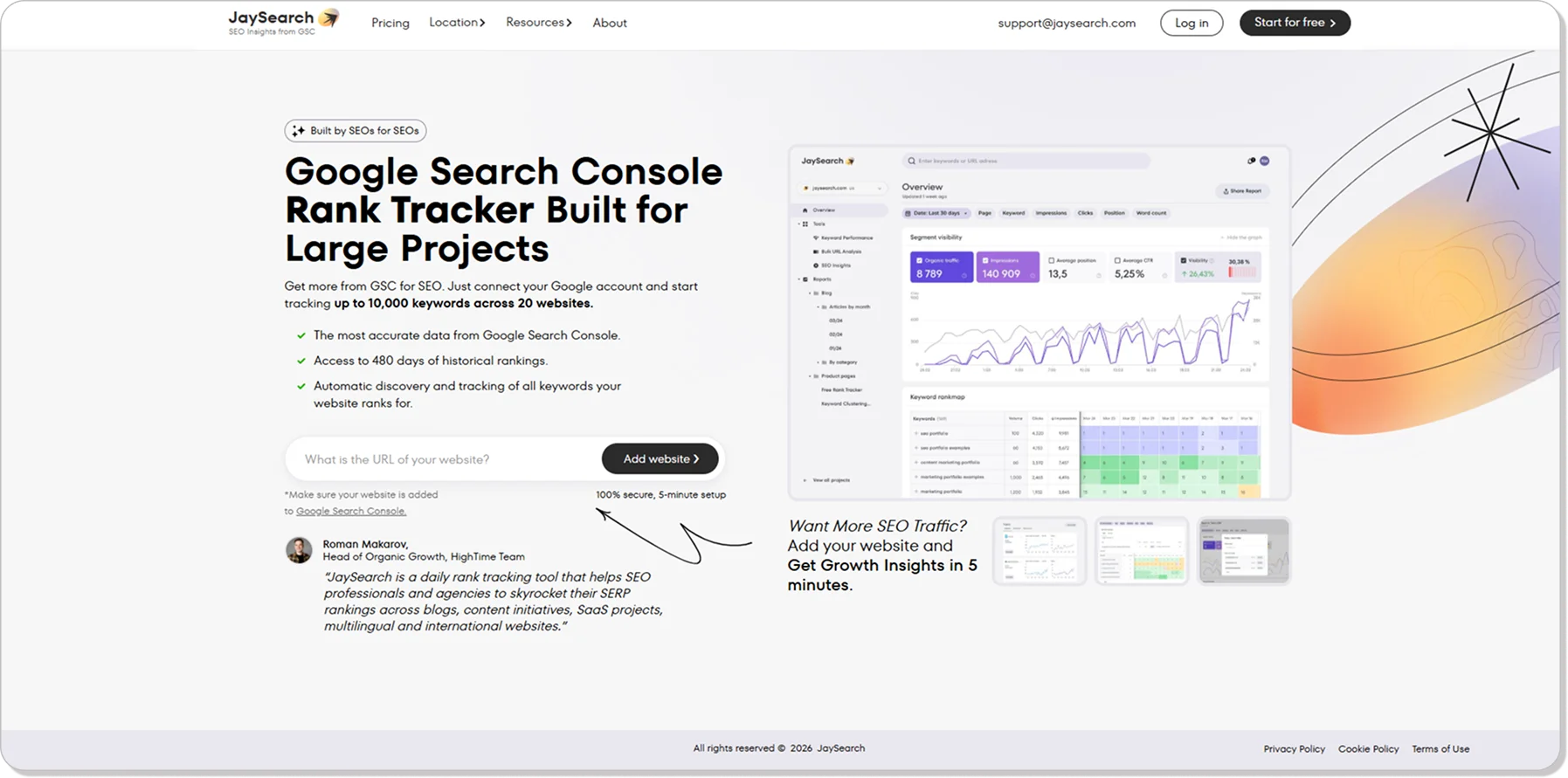
If you’re ready to use historical data to maximize your SEO opportunities but don’t feel like spending big bucks, JaySearch could be just the ranking tool you need. Signing up for the Starter Package won’t cost you a penny, and you can try the Growth Package for free for seven days. You’ll only pay $19 per month if you decide to stick with the Growth Package, and you’ll get a lot for your money.
You’ll be able to keep track of up to 1,000 pages and up to 10,000 keywords, and you’ll have access to data going back 480 days. The interface is simple and easy to use, and you’ll get two hours of SEO consultation every week. You won’t have to rely on online tutorials or AI live chat if you run into problems because JaySearch will assign an experienced SEO professional to work with you. We’ll look for opportunities that you could be missing, and you’ll be able to discuss your project with us one on one.
If you provide SEO services or run a website, JaySearch can get you pointed in the right direction. The competition is fierce in the world of SEO, and the landscape is always changing. If you don’t want to be left behind, sign up for JaySearch today and give yourself a winning advantage.